Insights
Thoughts, ideas, and case studies.
Article
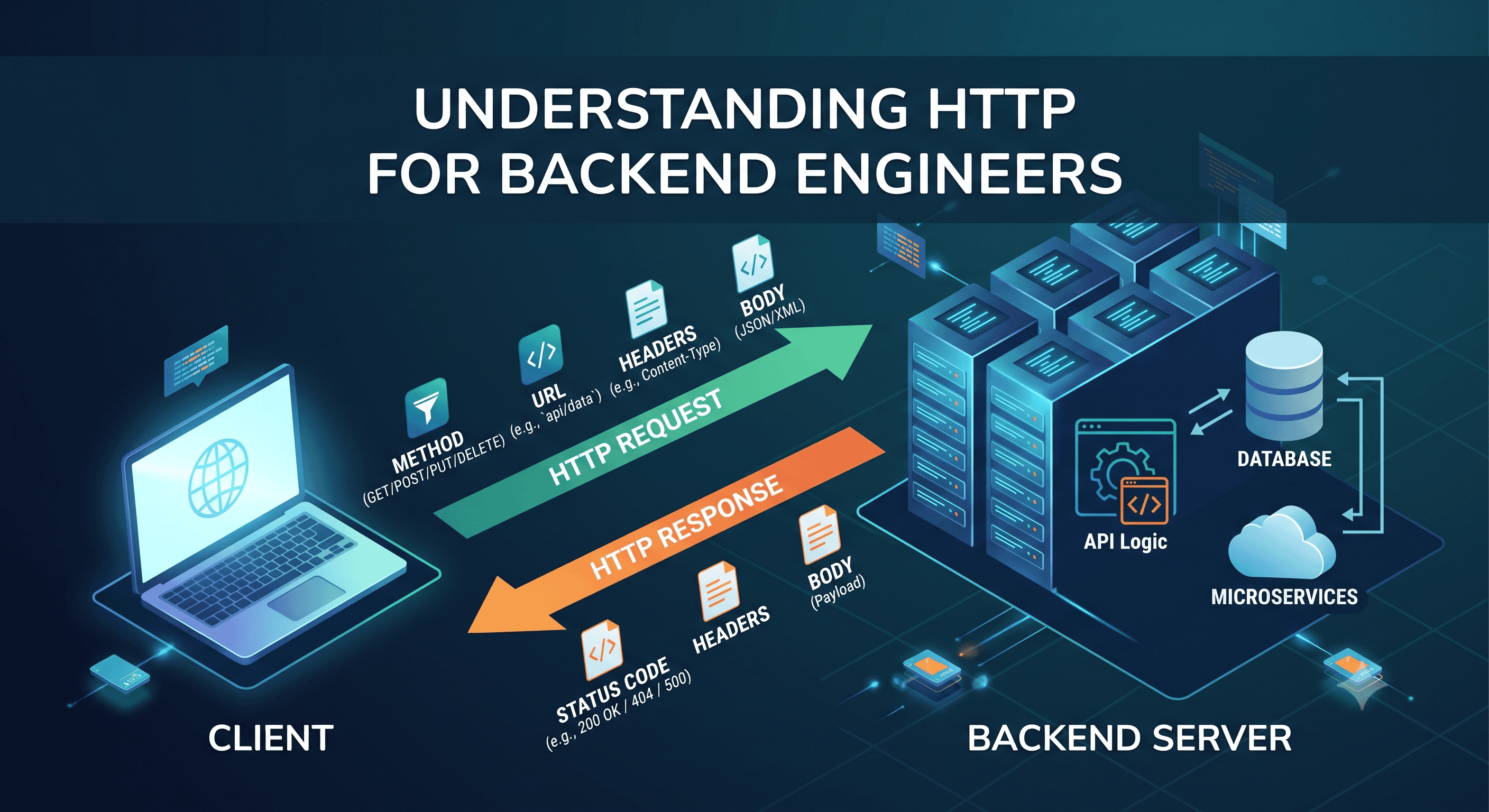
Understanding HTTP for backend engineers
Core Principles of HTTP
HTTP (Hypertext Transfer Protocol) is an application-layer protocol (Layer 7 in the OSI model) used by clients and servers to communicate. It is built on two fundamental ideas:
• Statelessness: The server retains no memory of past interactions. Every request is entirely self-contained and must include all the necessary information (like authentication tokens or cookies) for the server to process it.
• Benefits: This simplifies server architecture and improves scalability, because a single server doesn't need to keep track of user sessions, and a server crash won't destroy a client's state.
• Client-Server Model: Communication is always initiated by the client (e.g., a web browser) to request resources or actions, and the server waits for these requests to process and respond.
Transport Protocol & HTTP Versions
HTTP relies on a reliable, connection-based transport protocol, almost universally TCP (Transmission Control Protocol). Over the years, HTTP has evolved to improve how these TCP connections are handled:
• HTTP 1.0: Opened a new TCP connection for every single request and response, which was highly inefficient and slow.
• HTTP 1.1: Introduced persistent connections (keep-alive) as the default, allowing multiple requests to be sent over a single reused connection.
• HTTP 2.0: Introduced multiplexing (multiple requests/responses concurrently on one connection), binary framing, header compression, and server push.
• HTTP 3.0: Replaced TCP with QUIC (built over UDP) to establish faster connections and handle packet loss better, eliminating head-of-line blocking.
Anatomy of HTTP Messages
Client-server communication happens via structured text messages.
• Request Message (Client to Server): Contains a Request Method (e.g., GET/POST), the Resource URL, the HTTP version, Host domain, Headers, a blank line, and an optional Request Body.
• Response Message (Server to Client): Contains the HTTP version, a Status Code (e.g., 200), a Status Value (e.g., OK), Headers, a blank line, and the Response Body.
HTTP Headers
Headers are key-value pairs that act as metadata for the package being transmitted, allowing the system to be highly extensible and act as a "remote control" to dictate server behavior.
• Request Headers: Sent by the client to provide context (e.g., User-Agent identifies the browser, Authorization sends credentials).
• General Headers: Apply to both requests and responses (e.g., Date, Connection, Cache-Control).
• Representation Headers: Describe the message body (e.g., Content-Type for media format like JSON/HTML, Content-Length for byte size, Content-Encoding for gzip compression).
• Security Headers: Protect against attacks (e.g., Strict-Transport-Security forces HTTPS, Content-Security-Policy prevents cross-site scripting, Set-Cookie with HTTP-only flags).
HTTP Methods and Idempotency
Methods define the semantic intent of the client's request.
• GET: Fetches data from the server without modifying anything.
• POST: Submits new data to the server (includes a request body).
• PATCH: Partially updates an existing resource.
• PUT: Completely replaces an existing resource with the provided body.
• DELETE: Removes a resource.
• OPTIONS: Inquires about the server's capabilities (used heavily in CORS).
Idempotency is a crucial concept here:
• Idempotent Methods: Can be executed multiple times and yield the exact same result on the server state (e.g., GET, PUT, DELETE).
• Non-Idempotent Methods: Running them multiple times creates different results (e.g., submitting a POST request twice creates two separate resources).
Cross-Origin Resource Sharing (CORS)
Browsers enforce a Same-Origin Policy, blocking web apps from making requests to different domains (origins). CORS is a security mechanism to bypass this safely.
• Simple Requests: (Usually GET or POST with standard headers/content types). The browser automatically adds an Origin header. If the server allows the request, it replies with the Access-Control-Allow-Origin header containing the client's domain (or a * wildcard). If missing, the browser blocks the response.
• Pre-flight Requests: Triggered if a request uses a non-simple method (PUT/DELETE), requires authorization headers, or uses an application/json content type.
• The browser first fires an OPTIONS request asking the server if the route supports the intended method and headers.
• The server replies with a 204 No Content status, explicitly listing allowed origins, methods, headers, and a max-age to cache this configuration.
• If successful, the browser then sends the actual, original request.
Standardized Status Codes
Status codes are three-digit numbers that act as a universal language to indicate the outcome of a request.
• 1xx (Informational): Indicates headers received; client can proceed (e.g., 100 Continue for large uploads).
• 2xx (Success):
• 200 OK: Successful operation.
• 201 Created: Usually follows a POST request.
• 204 No Content: Successful, but no body to return (used in OPTIONS or DELETE).
• 3xx (Redirection):
• 301 Moved Permanently: The resource has a new URL.
• 302 Found/Temporary Redirect: Temporarily forward to a new route.
• 304 Not Modified: Tells the client to use its locally cached version.
• 4xx (Client Errors):
• 400 Bad Request: Invalid data format sent by client.
• 401 Unauthorized: Missing or invalid authentication token.
• 403 Forbidden: Authenticated, but lacks necessary permissions.
• 404 Not Found: Incorrect URL or deleted resource.
• 405 Method Not Allowed: Using the wrong method for a route.
• 409 Conflict: Business logic violation (e.g., duplicate username).
• 429 Too Many Requests: Client has hit rate limits.
• 5xx (Server Errors):
• 500 Internal Server Error: An unhandled exception crashed the server.
• 501 Not Implemented: Feature not yet supported.
• 502 Bad Gateway / 504 Gateway Timeout: Issues originating from proxies or load balancers failing to reach upstream servers.
• 503 Service Unavailable: Server down or under maintenance.
HTTP Caching
Caching reuses previously downloaded responses to save bandwidth and load times.
• When a client first fetches a resource, the server responds with the payload alongside three headers: Cache-Control (sets max duration), ETag (a unique hash of the payload), and Last-Modified.
• On subsequent requests, the client sends conditional headers: If-None-Match (carrying the ETag) or If-Modified-Since.
• If the data on the server hasn't changed, the server saves bandwidth by sending an empty 304 Not Modified response, instructing the browser to use its cached copy. If it has changed, it sends a 200 OK with the new data and a new ETag.
Content Negotiation and Compression
Clients and servers can negotiate the best format to exchange data.
• The client sends preferences via Accept (e.g., application/json vs application/xml), Accept-Language (e.g., en vs es), and Accept-Encoding (e.g., gzip).
• The server responds with the appropriate format.
• Compression: By negotiating an encoding like gzip, a server can drastically compress text responses (e.g., shrinking a 26MB JSON payload down to 3.8MB) to save massive amounts of network bandwidth.
Handling Large Data Transfers
• Large Client Uploads (Images/Video): Standard JSON is terrible for binary data. Instead, clients use a multipart/form-data request. This breaks the file into chunks separated by a unique string delimiter defined in the boundary header.
• Large Server Downloads: To prevent timing out, the server streams the file in chunks using Content-Type: text/event-stream and Connection: keep-alive. The browser continually appends these chunks until the transfer finishes.
Security (SSL/TLS & HTTPS)
• TLS (Transport Layer Security): The modern, secure replacement for the outdated SSL protocol.
• It encrypts data in transit to prevent interception (eavesdropping) or tampering, utilizing certificates to verify the server's identity.
• HTTPS: Simply the standard HTTP protocol wrapped inside a secure TLS connection.
Aug 3, 2026
Article
Authentication & Authorization Explained
Authentication & Authorization Explained
From Cookies to OAuth 2.1
Introduction
Authentication and authorization are two of the most fundamental concepts in application security. Every modern application—whether it's a social media platform, an e-commerce website, a banking system, or a REST API—relies on these mechanisms to protect resources and ensure that only legitimate users can access sensitive information.
Whenever a client sends a request to a protected resource, the server must answer two fundamental questions.
• Who is making this request?
• What is this requester allowed to do?
The first question is answered through authentication.
The second question is answered through authorization.
Although these concepts are closely related and are often implemented together, they solve entirely different problems.
Authentication establishes identity.
Authorization enforces permissions.
Every secure application requires both.
Authentication
Authentication is the process of verifying the identity of a user, application, or device before access to a protected resource is granted.
Its primary objective is to answer a single question.
"Who are you?"
An authentication system attempts to prove that the entity making a request is genuinely who it claims to be.
Modern authentication systems generally rely on one or more authentication factors.
• Something You Know
Information that only the legitimate user should know.
Examples include:
• Password
• PIN
• Security Question
• Something You Have
A physical object or digital device possessed by the legitimate user.
Examples include:
• Mobile Phone
• Hardware Security Key
• Authenticator Application
• Smart Card
• Something You Are
Biological characteristics unique to an individual.
Examples include:
• Fingerprint
• Facial Recognition
• Retina Scan
• Voice Recognition
Modern security systems often combine multiple authentication factors to improve account security.
This approach is known as Multi-Factor Authentication (MFA).
Authorization
Authorization is the process of determining which resources or operations an authenticated identity is permitted to access.
Unlike authentication, authorization assumes that identity verification has already been completed.
Its primary objective is to answer a different question.
"What are you allowed to do?"
Consider a project management application.
An Administrator may be allowed to:
• Create Projects
• Delete Projects
• Manage Users
• Configure Application Settings
• Access Billing Information
A Team Member may only be allowed to:
• View Projects
• Create Tasks
• Update Assigned Tasks
• Upload Attachments
Both users are successfully authenticated.
However, they receive different permissions because authorization policies determine which actions each identity is allowed to perform.
Authorization decisions are commonly based on:
• Roles
• Individual Permissions
• Access Control Lists (ACL)
• Attribute-Based Access Control (ABAC)
• Organizational Policies
Unlike authentication, authorization may occur multiple times during a single session because every protected request may require a new permission evaluation.
Aug 4, 2026
Article
REST API Design
Here is a comprehensive breakdown of the video's content, formatted as structured notes with code examples. This will give you the full context of REST API design and act as a practical reference guide.
Comprehensive Notes: REST API Design Guide
Designing a good API interface is one of the most critical tasks for a backend engineer. By adhering to standardized conventions, you remove guesswork for consumers, reduce integration bugs, and create a scalable system.
1. The History and Core Concepts of REST
To understand why we build APIs a certain way, it helps to know the history of the web.
1990: Tim Berners-Lee invents the World Wide Web, along with URIs, HTTP, and HTML.
The Scalability Crisis: The web grew exponentially, leading to fears that the architecture would break down under the load.
1993-2000: Roy Fielding (co-founder of the Apache HTTP server) proposed architectural constraints to fix web scalability. In his 2000 PhD dissertation, he named this style REST (Representational State Transfer).
The 6 Architectural Constraints of REST
Client-Server: Strict separation of concerns (frontend handles UI, backend handles data/logic).
Uniform Interface: Standardized communication between components.
Layered System: Architecture is hierarchical (e.g., placing a load balancer between the client and server shouldn't break functionality).
Cache: Responses must be labeled as cacheable or non-cacheable to improve network efficiency.
Stateless: Crucial rule. Every request must contain all the information necessary for the server to understand it. The server does not remember previous requests.
Code on Demand (Optional): Servers can temporarily transfer executable code (like JavaScript) to the client.
What does "Representational State Transfer" actually mean?
Representational: Resources (data) can be formatted in different ways based on the client's needs (e.g., JSON for an API client, HTML for a web browser).
State: The current condition or attributes of a specific resource at a given moment.
Transfer: Moving these resource representations between the client and server using standard HTTP methods.
2. Anatomy of an API URL
An API endpoint should be readable, predictable, and hierarchical.
Standard Structure:
[https://api.example.com/v1/resources](https://api.example.com/v1/resources) Scheme: https:// (Secure HTTP). Subdomain/Domain: api.example.com. Versioning: /v1/ (Crucial for not breaking existing clients when making major changes later). Path/Resource: /books (The data you are accessing). Golden Rules for URL Paths: Always use Plural Nouns: Even if fetching a single item, use the plural form to denote the collection. Correct: /books/123 Incorrect: /book/123 No Spaces or Underscores: Use hyphens (kebab-case) and lowercase letters for slugs. Correct: /books/harry-potter Hierarchical Relationships: A forward slash / implies moving deeper into a hierarchy (e.g., from a list of books -> to a specific book ID). 3. Idempotency & HTTP Methods Idempotency is the concept that performing an action multiple times yields the same side effect on the server as performing it just once. MethodIdempotent?Purpose & BehaviorGET✅ YesFetch data. Calling it 1,000 times causes no changes to the server data.PUT✅ YesReplace an entire resource. Sending the exact same payload multiple times results in the same final state.PATCH✅ YesPartially update a resource. Updating status: "active" multiple times keeps it "active".DELETE✅ YesRemove a resource. The first call deletes it; subsequent calls return a 404 Not Found (no new side effects are caused).POST❌ NoCreate a new resource. Calling it 5 times creates 5 new records with different IDs. 4. The API Design Workflow Do not start coding your backend immediately. Follow this workflow: Analyze UI Wireframes/Figma: Look at the user interface to identify the "nouns" of your system. Identify Resources: If building a Project Management App, your nouns are Organizations, Projects, and Tasks. Design DB Schema: Map those resources to database tables. Design the API Interface (Swagger/Insomnia): Define your routes, payloads, and expected responses before writing business logic. 5. Standard CRUD Endpoints & Implementation Details Let's look at how to implement standard endpoints using an Organization resource as an example. A. Create Resource (POST) Endpoint: POST /organizations
Behavior: Accepts a JSON body (ignoring server-generated fields like IDs and timestamps).
Success Response: 201 Created // Request Body { "name": "Org 1", "description": "My first organization", "status": "active" } // Response (201 Created) { "id": "abc-123", "name": "Org 1", "description": "My first organization", "status": "active", "createdAt": "2026-08-09T10:00:00Z" } B. List Resources (GET) Endpoint: GET /organizations
Behavior: Fetches a collection. It must support Pagination, Sorting, and Filtering to avoid overloading the server.
Success Response: 200 OK (Even if the list is empty, return an empty array [] with a 200 status, never a 404). // Example Request with Query Params GET /organizations?limit=10&page=2&sortBy=name&sortOrder=asc&status=active // Paginated Response Structure { "data": [ { "id": "abc-123", "name": "Org 1", "status": "active" }, { "id": "def-456", "name": "Org 2", "status": "active" } ], "total": 50, "page": 2, "totalPages": 5 } C. Get Single Resource (GET) Endpoint: GET /organizations/:id
Behavior: Fetches a specific entity using a dynamic ID parameter.
Success Response: 200 OK
Error Response: 404 Not Found (If the ID does not exist). D. Update Resource (PATCH) Endpoint: PATCH /organizations/:id
Behavior: Updates specific fields provided in the payload without replacing the whole object.
Success Response: 200 OK (Returns the updated object). // Request Body { "status": "archived" } E. Delete Resource (DELETE) Endpoint: DELETE /organizations/:id
Behavior: Removes the resource from the database.
Success Response: 204 No Content (Returns an empty response body because the item is gone). F. Custom Actions (POST) Sometimes an action doesn't fit standard CRUD (e.g., archiving an org, cloning a project, sending an email). In REST, you handle this by creating an open-ended POST endpoint with the action at the end of the URL.
Success Response: 200 OK or 201 Created depending on what happens server-side. Endpoint: POST /organizations/:id/archive
Endpoint: POST /projects/:id/clone 6. Best Practices for Developers To be a top-tier backend engineer, stick to these rules: Provide Sane Defaults: Do not force the client to pass obvious data. If page isn't passed -> default to 1. If limit isn't passed -> default to 10. If sortOrder isn't passed -> default to desc. If a status isn't passed on creation -> default to active. Be Ruthlessly Consistent: If you name a field description in one endpoint, do not name it desc in another. Use camelCase uniformly across all JSON payloads and responses. Write Interactive Documentation: Use tools like Swagger (OpenAPI) so frontend engineers don't have to guess how your API works. Don't Use 404s for Empty Lists: If a filter yields zero results in a GET /resources call, return 200 OK with an empty array. Reserve 404 for when a client specifically asks for an ID that doesn't exist.
Aug 9, 2026[https://api.example.com/v1/resources](https://api.example.com/v1/resources) Scheme: https:// (Secure HTTP). Subdomain/Domain: api.example.com. Versioning: /v1/ (Crucial for not breaking existing clients when making major changes later). Path/Resource: /books (The data you are accessing). Golden Rules for URL Paths: Always use Plural Nouns: Even if fetching a single item, use the plural form to denote the collection. Correct: /books/123 Incorrect: /book/123 No Spaces or Underscores: Use hyphens (kebab-case) and lowercase letters for slugs. Correct: /books/harry-potter Hierarchical Relationships: A forward slash / implies moving deeper into a hierarchy (e.g., from a list of books -> to a specific book ID). 3. Idempotency & HTTP Methods Idempotency is the concept that performing an action multiple times yields the same side effect on the server as performing it just once. MethodIdempotent?Purpose & BehaviorGET✅ YesFetch data. Calling it 1,000 times causes no changes to the server data.PUT✅ YesReplace an entire resource. Sending the exact same payload multiple times results in the same final state.PATCH✅ YesPartially update a resource. Updating status: "active" multiple times keeps it "active".DELETE✅ YesRemove a resource. The first call deletes it; subsequent calls return a 404 Not Found (no new side effects are caused).POST❌ NoCreate a new resource. Calling it 5 times creates 5 new records with different IDs. 4. The API Design Workflow Do not start coding your backend immediately. Follow this workflow: Analyze UI Wireframes/Figma: Look at the user interface to identify the "nouns" of your system. Identify Resources: If building a Project Management App, your nouns are Organizations, Projects, and Tasks. Design DB Schema: Map those resources to database tables. Design the API Interface (Swagger/Insomnia): Define your routes, payloads, and expected responses before writing business logic. 5. Standard CRUD Endpoints & Implementation Details Let's look at how to implement standard endpoints using an Organization resource as an example. A. Create Resource (POST) Endpoint: POST /organizations
Behavior: Accepts a JSON body (ignoring server-generated fields like IDs and timestamps).
Success Response: 201 Created // Request Body { "name": "Org 1", "description": "My first organization", "status": "active" } // Response (201 Created) { "id": "abc-123", "name": "Org 1", "description": "My first organization", "status": "active", "createdAt": "2026-08-09T10:00:00Z" } B. List Resources (GET) Endpoint: GET /organizations
Behavior: Fetches a collection. It must support Pagination, Sorting, and Filtering to avoid overloading the server.
Success Response: 200 OK (Even if the list is empty, return an empty array [] with a 200 status, never a 404). // Example Request with Query Params GET /organizations?limit=10&page=2&sortBy=name&sortOrder=asc&status=active // Paginated Response Structure { "data": [ { "id": "abc-123", "name": "Org 1", "status": "active" }, { "id": "def-456", "name": "Org 2", "status": "active" } ], "total": 50, "page": 2, "totalPages": 5 } C. Get Single Resource (GET) Endpoint: GET /organizations/:id
Behavior: Fetches a specific entity using a dynamic ID parameter.
Success Response: 200 OK
Error Response: 404 Not Found (If the ID does not exist). D. Update Resource (PATCH) Endpoint: PATCH /organizations/:id
Behavior: Updates specific fields provided in the payload without replacing the whole object.
Success Response: 200 OK (Returns the updated object). // Request Body { "status": "archived" } E. Delete Resource (DELETE) Endpoint: DELETE /organizations/:id
Behavior: Removes the resource from the database.
Success Response: 204 No Content (Returns an empty response body because the item is gone). F. Custom Actions (POST) Sometimes an action doesn't fit standard CRUD (e.g., archiving an org, cloning a project, sending an email). In REST, you handle this by creating an open-ended POST endpoint with the action at the end of the URL.
Success Response: 200 OK or 201 Created depending on what happens server-side. Endpoint: POST /organizations/:id/archive
Endpoint: POST /projects/:id/clone 6. Best Practices for Developers To be a top-tier backend engineer, stick to these rules: Provide Sane Defaults: Do not force the client to pass obvious data. If page isn't passed -> default to 1. If limit isn't passed -> default to 10. If sortOrder isn't passed -> default to desc. If a status isn't passed on creation -> default to active. Be Ruthlessly Consistent: If you name a field description in one endpoint, do not name it desc in another. Use camelCase uniformly across all JSON payloads and responses. Write Interactive Documentation: Use tools like Swagger (OpenAPI) so frontend engineers don't have to guess how your API works. Don't Use 404s for Empty Lists: If a filter yields zero results in a GET /resources call, return 200 OK with an empty array. Reserve 404 for when a client specifically asks for an ID that doesn't exist.